|
|
|
|
|
It is possible that the download link provided above does not refer to the intended version.
If you are looking for Norman Personal Firewall, you may try searching for a download link using
Google. |
|
| |
|
|
Video tutorial for Norman Personal Firewall 1.3
|
Review
This review applies to version 1.3
The latest version of this software will soon be reviewed by our
informers.
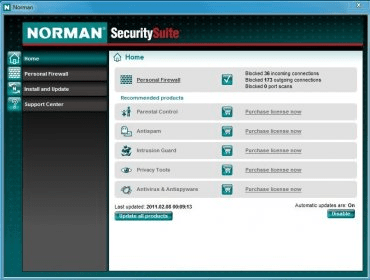
Features: - Real-time protection against hackers and malicious web robots by filtering inbound and outbound traffic as well as alerting you of attempted attacks. - Two-way firewall filters both incoming and outgoing data traffic blocking external machines trying to connect to the computer, as well as applications on the computer that are trying to connect to other systems on the network. - Launcher protection that detects attempts from an application to launch itself through another application. - Stealth launch protection that uncovers malicious applications attempting to access the Internet via other applications. The Personal Firewall keeps track of all parent applications. - Process hijacking protection detects and reports trojans and spyware attempting to hijack legitimate applications by inserting malicious code. - Full stealth mode that ensures that all ports on your computer are completely invisible from the outside. - Antipharming implemented through protection of the HOSTS file and therefore eliminating the most common pharming attack method. - Self-protection prevents malware to terminate the firewall. - Installation wizard features an easy to use application that detects installed browsers, email clients, and several other applications that require internet access, and automatically creates rules for the user. The setup wizard let you decide your experience level, making it possible for the advanced users to fine-tune their settings. - Predefined rules includes a wide range of rules that cover most of the preinstalled applications and features in the Microsoft operating system, making it easy to install and use this security software. All predefined rules and configurations can be tuned by an experienced user through configuration options. - Advanced svchost handling, where each svchost service has separate rules rather than one general rule to cover the grouping of services that each Svchost.exe session can contain. - Cooperative with other security software like antivirus and antispyware applications. Norman Personal Firewall (NPF) can run on any machine that runs any national language version of Windows 95/98/Me and Windows NT/2000/XP installed. For Windows 95, Internet Explorer 4.0 or higher is required. For Windows NT, version 4 with SP4 or higher is required. Windows NT/2000: You need administrator privileges to start/stop NPF. |
|
Report a wrong version
Report a wrong program title
Suggest a correction
|
Screenshots
|
|
|